
.gif?cb=193cd26fe962144f1028924bd1d79777)
Release Notes – OMS – May 2026
Welcome to the May 2026 edition of XStak’s OMS Release Notes. This release introduces updates designed to improve order visibility, streamline fulfillment workflows, reduce operational errors, and give merchants greater control across the order management lifecycle.
1. OMS Slip Enhancement – Shipper Contact Number
The OMS slip has been enhanced to include additional shipper information.
Enhancement Details:
-
The shipper contact number is now displayed on the OMS slip for all orders.
Key Benefits:
-
Improves shipment identification and communication
-
Provides complete shipper information on printed slips
2. Order List Report Enhancement – COD and Paid Amount
The Order List Report has been enhanced to provide better payment visibility and financial tracking.
Enhancement Details:
-
Added COD Amount column to display the total COD value for each order
-
Added Paid Amount column to display the amount already paid against each order
Key Benefits:
-
Improves payment tracking and reconciliation
-
Provides greater visibility into order-level financial data
-
Enhances reporting accuracy for merchants and operations teams

2.1 Order List Report Enhancement
3. Review Report Enhancement – Order Creation Date & Time
The Review Report has been enhanced to provide additional visibility into order timelines.
Enhancement Details:
-
Added an Order Creation Date and Time column to the Review Report.
Key Benefits:
-
Improves operational tracking and order monitoring
-
Provides better visibility into order timelines for reporting and analysis
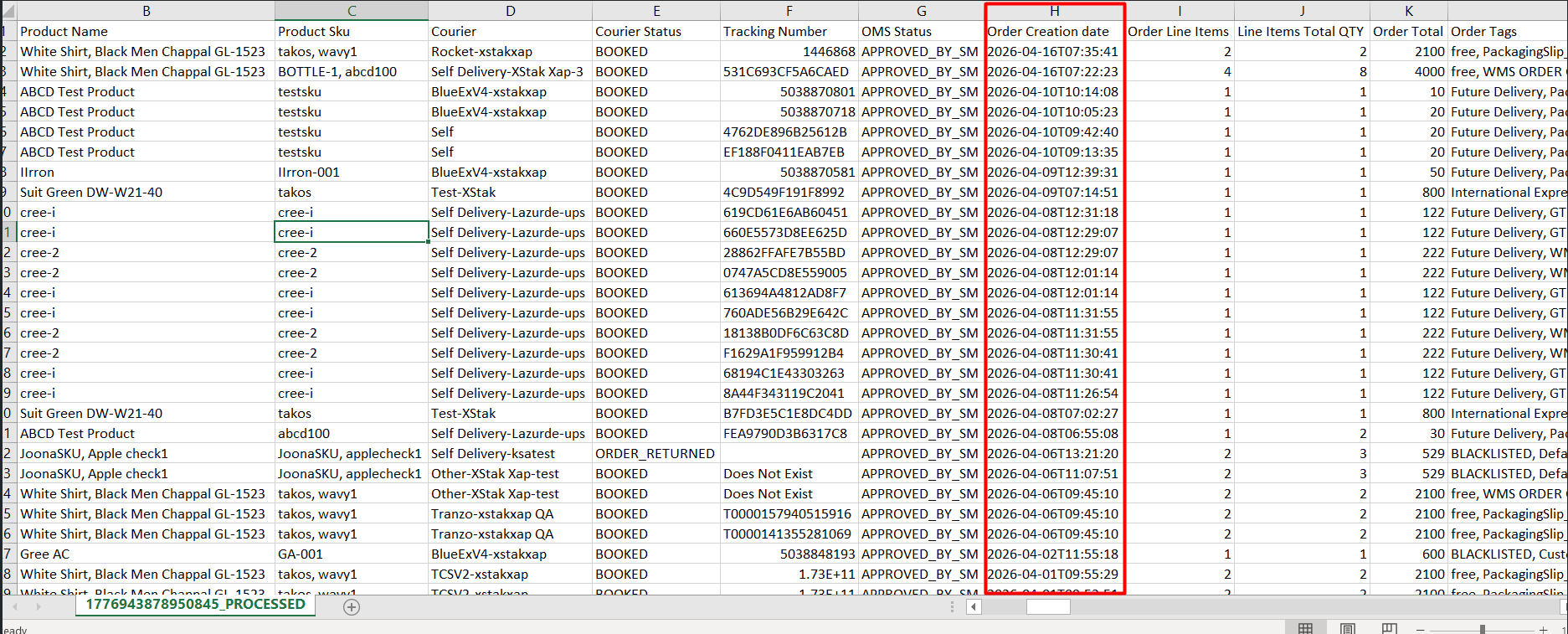
3.1 Review Report
4. Country Filter Enhancement – Exclude Option
The Order Management → Search / Filter functionality has been enhanced to provide more flexible country-based filtering.
Enhancement Details:
-
Added an Exclude option to the Country filter under Additional Fields
-
When enabled, OMS excludes orders from the selected country and displays orders from all other countries
Key Benefits:
-
Provides greater flexibility in order filtering
-
Simplifies operational reporting and analysis
-
Enhances user experience with more advanced search capabilities
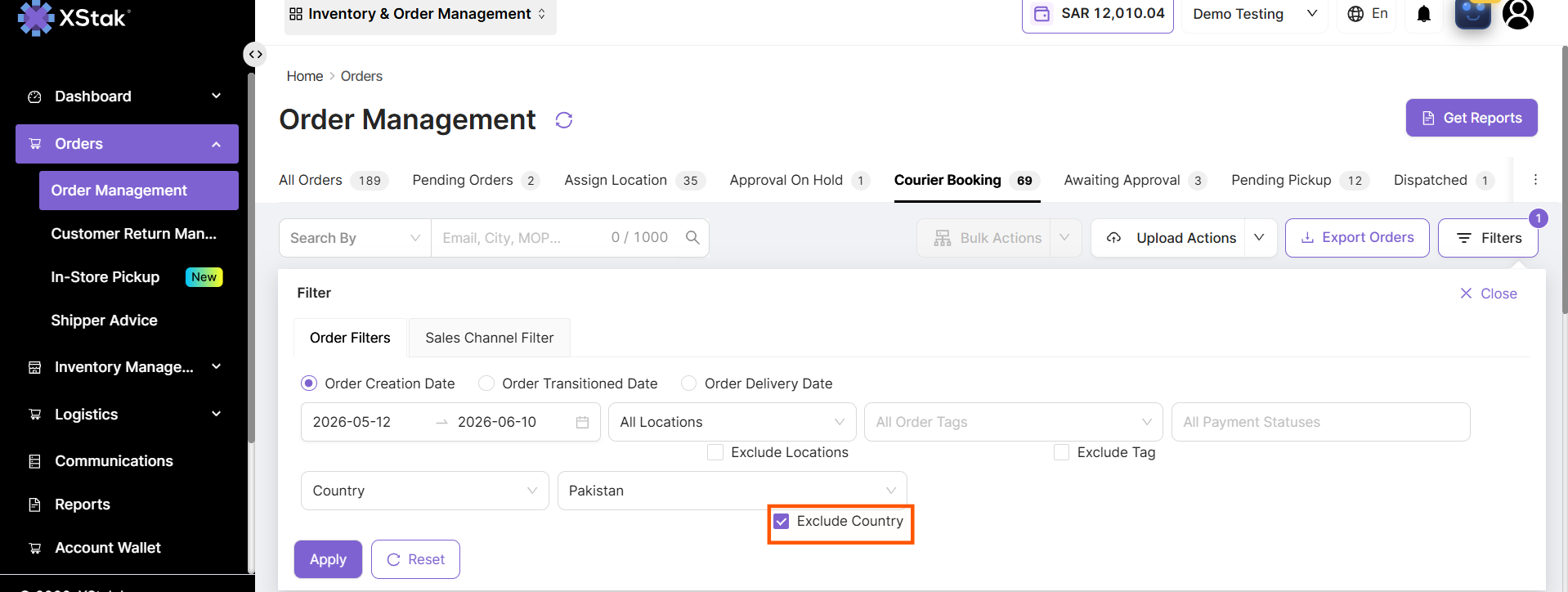
4.1 Exclude Country Filter
5. Downloadable Sample Files for Bulk Actions
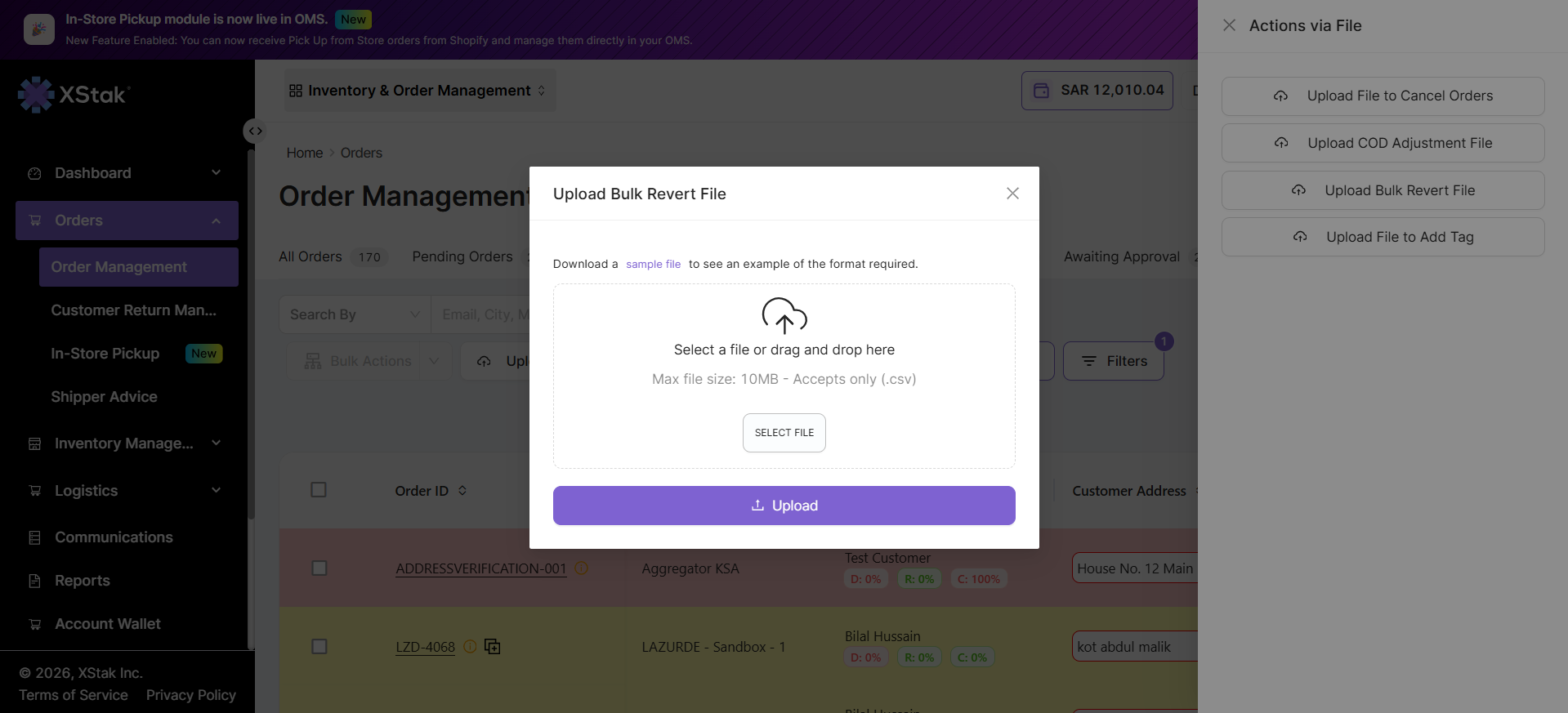
OMS has been enhanced with action-specific downloadable templates to simplify bulk order operations and reduce upload errors.
Previous Behavior:
-
Merchants could perform bulk actions by uploading files
-
No predefined templates were available for different action types
-
Incorrect file formats, missing columns, and invalid headers frequently caused upload failures and support requests
Enhancement Details:
-
Added downloadable sample files for bulk actions across all OMS order tabs
-
Each sample file contains the required file structure, headers, and format for the selected action
-
Sample Files are now available directly alongside their respective upload actions
Key Benefits:
-
Reduces file upload errors and validation failures
-
Minimizes support requests related to bulk uploads
-
Improves user experience and operational efficiency
-
Ensures consistent file formats across all OMS bulk actions
6. QWQER Courier Integration
A new courier integration has been added to OMS to expand shipping and fulfillment capabilities.
Feature Overview:
-
Integrated QWQER Courier with OMS
-
Enables order booking directly from OMS
-
Supports shipment tracking and courier workflow management within the platform
Key Benefits:
-
Streamlines courier operations through a single interface
-
Reduces dependency on external courier portals
Improves fulfillment visibility by supporting booking and tracking workflows within OMS
7. New Tab Addition in OMS – Approval On Hold
A new Approval On Hold tab has been introduced in OMS to provide greater control over order processing workflows.
Feature Overview:
-
Added the Approval On Hold tab after the Assign Location stage.
-
Allows merchants to temporarily place orders on hold before courier booking
-
Held orders remain in the Approval On Hold tab until further action is taken
Configuration:
-
The tab is disabled by default
-
Merchants can enable it from:
-
Settings → General Settings → Additional Tabs
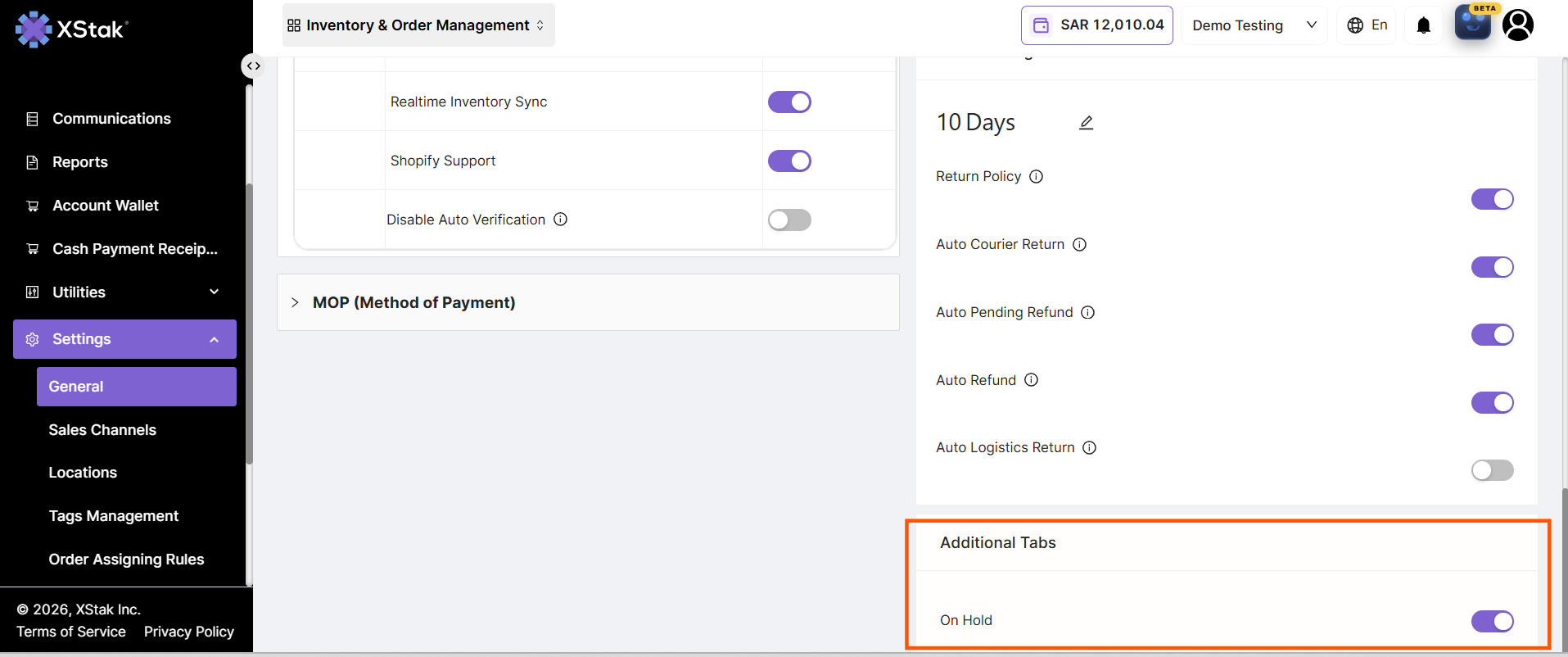
7.1 Settings
-
-
Once enabled, the tab becomes visible on the Order Listing page
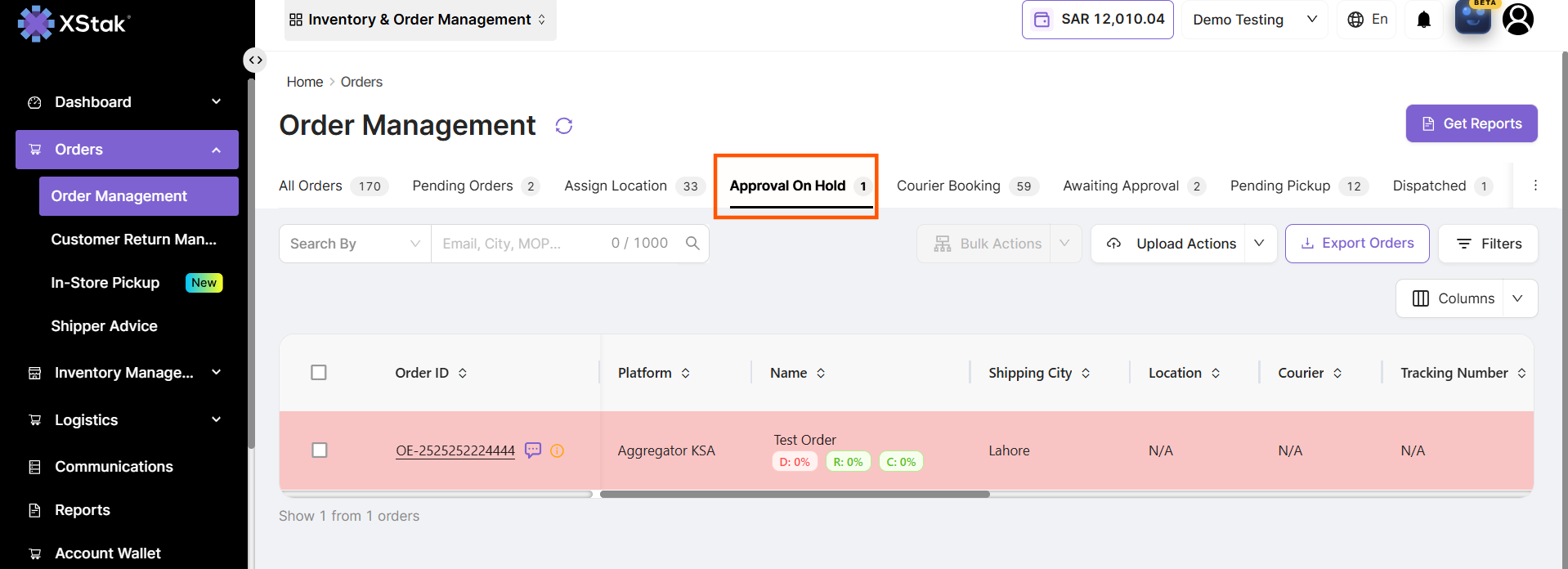
7.2 Approval On Hold Tab
Key Benefits:
-
Provides flexibility in managing order approval workflows
-
Allows merchants to pause order processing when required
-
Improves operational control before orders proceed to courier booking
We appreciate your continued support and value your feedback as we continue to enhance OMS and the overall XStak experience. If you have any questions, concerns, or suggestions, please reach out to our support team.
Thank you for choosing XStak as your trusted partner. We hope these release notes help you understand the latest improvements and make the most of the new capabilities introduced this month. Stay tuned for more updates.