
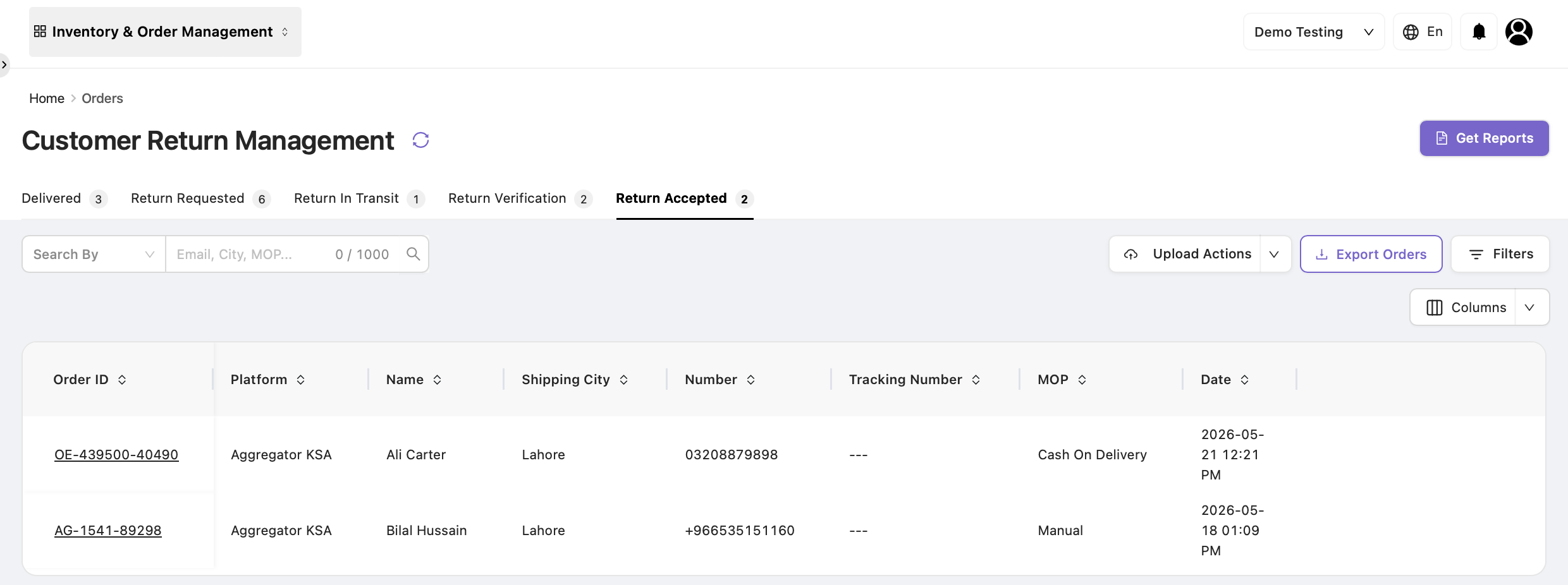
The Return Accepted tab displays orders that have completed return verification and are marked as Return Accepted.
Use this tab to review accepted return orders and export order data for reporting, auditing, and reconciliation.
Purpose of the Return Accepted Tab
The Return Accepted tab provides visibility into orders accepted after return verification.
This tab helps users:
-
View accepted return order details.
-
Export accepted return records.
-
Generate reports for operational and audit purposes.
Available Actions
View Order Details
Click an Order ID to open the order details page.
The order details provide information such as:
-
Customer details.
-
Order information.
-
Return history.
-
Product details.
-
Tags and comments.
-
Order timeline.
This tab is primarily for viewing and tracking accepted returns.
Export Orders
Export accepted return orders by clicking the Export Orders button.
The exported file can be used for:
-
Reporting.
-
Auditing.
-
Operational tracking.
-
Return reconciliation.
Generate Reports
Click Get Reports to generate reports based on applied filters and selected criteria.
Reports can be used to:
-
Analyze accepted returns.
-
Review return trends.
-
Track operational performance.
Order Journey
Orders reach this tab after completing the following workflow:
Delivered → Return Requested → Return In Transit → Return Verification → Return Accepted
Once an order appears in this tab, the return has been successfully verified and accepted.
Purpose of the Return Accepted Tab
|
Purpose |
Explanation |
|---|---|
|
Return Visibility |
Displays all accepted return orders. |
|
Order Tracking |
Provides visibility into completed returns. |
|
Reporting |
Supports exports and reporting. |
|
Auditing |
Maintains records of accepted returns. |
|
View-Only Access |
No further return actions are performed from this tab. |