
Orders Module
Purpose: This document is intended for OMS users, operations teams, customer support teams, and business stakeholders who need to understand how orders are processed, tracked, returned, cancelled, or coordinated for shipping in XStak OMS.
Overview
The Orders module is the core operational area of the XStak OMS system responsible for managing the complete lifecycle of customer orders.
It provides a centralized workspace where all orders are processed, tracked, and managed from creation to final delivery, return, refund, or cancellation.
This module ensures complete visibility and control over order operations across all sales channels, enabling teams to efficiently manage high-volume order flows in a structured and standardized manner.
Prerequisites
-
Users must have access to the XStak OMS platform with the appropriate role permissions for order operations.
-
Access to specific order actions, such as cancellation, refund, return approval, or shipment updates, may vary based on user role.
-
If the Orders module or any sub-module is not visible, contact your OMS administrator to confirm access rights.
Key Capabilities at a Glance
|
Capability |
What it helps users do |
|---|---|
|
Order Tracking |
Monitor orders from creation through fulfillment, delivery, return, cancellation, or refund. |
|
Centralized Processing |
Manage high-volume order workflows from a single operational workspace. |
|
Return Management |
Review and process customer return requests with lifecycle visibility. |
|
Shipping Coordination |
Coordinate courier instructions, dispatch activity, and shipper advice workflows. |
|
Operational Visibility |
Give teams a consistent view of order status across channels and fulfillment stages. |
How to Access Orders Module
To access the Orders module:
-
Log in to the XStak OMS platform
-
From the left navigation menu, click Orders
-
The Orders landing page will open with multiple operational sub-modules
-
Use the top navigation tabs to switch between different order workflows
Tip: If you cannot see the Orders option in the left navigation, verify that your user role has the required permissions for order management.
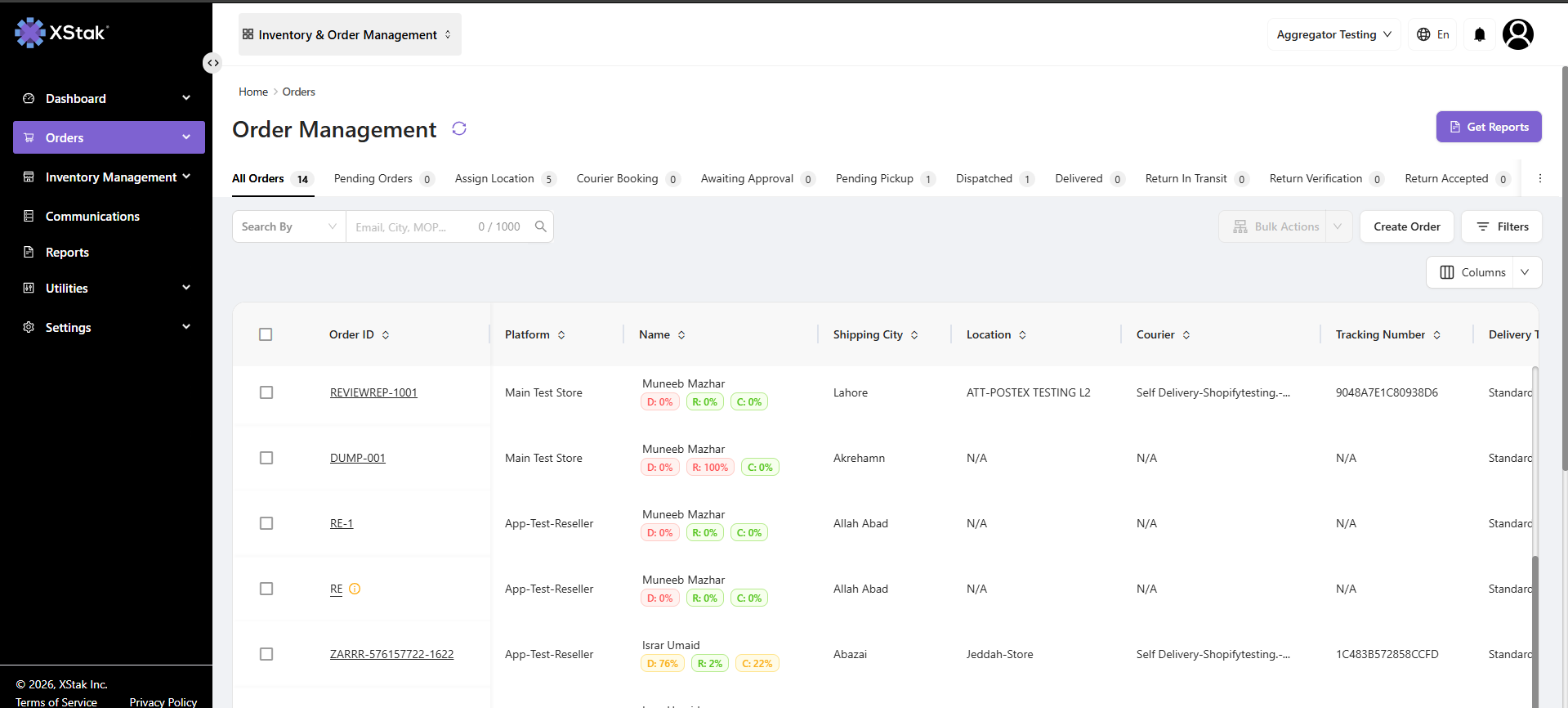
Orders Module Structure
The Orders module is divided into three main sub-modules, each serving a specific operational purpose within the order lifecycle.
|
Sub-Module |
Purpose |
|---|---|
|
Order Management |
Central hub for processing and tracking all orders |
|
Customer Return Management |
Handles all customer return requests and return lifecycle |
|
Shipper Advice |
Manages courier/shipping instructions and dispatch coordination |
Recommended Usage
-
Use Order Management for day-to-day order processing, status tracking, fulfillment follow-ups, and exception handling.
-
Use Customer Return Management when reviewing customer return requests, return approvals, received items, or refund-related follow-ups.
-
Use Shipper Advice to coordinate shipping instructions, courier updates, and dispatch-related communication.
Data Freshness Note
The Orders module provides an operational view of order activity. Order statuses may update as fulfillment, courier, return, or cancellation events are synced into OMS. Refresh the page or revisit the relevant sub-module to view the latest available status.
Related Pages / Next Steps
-
Open Order Management to review the full order processing workflow.
-
Open Customer Return Management to understand how customer returns are handled.
-
Open Shipper Advice to review shipping coordination and courier instruction processes.