
Shipper Advice Module – Overview
The Shipper Advice module manages orders where a courier attempted delivery but could not complete it successfully. It acts as a decision point where the merchant or operations team reviews the failed delivery reason and chooses the next action.
1. Overview
The Shipper Advice tab contains orders with a failed delivery attempt where the courier has shared a delivery failure status.
This typically occurs when:
-
The courier is unable to contact the customer.
-
The customer’s phone number is unreachable or incorrect.
-
The customer is unavailable at the time of delivery.
-
The customer refuses to accept the order.
-
Delivery cannot be completed due to operational or location constraints.
Not all failed deliveries are included in Shipper Advice. Only cases where the courier explicitly sends a delivery failure status requiring an operational decision appear here.
This stage allows the merchant to review the rider remarks and decide whether to:
-
Reattempt delivery.
-
Return the shipment to origin (RTO).
2. Data Available in Shipper Advice
Each order in this tab includes the following key information:
-
Rider Remarks
The courier’s explanation of why the delivery attempt failed. -
Shipper Remarks
Internal notes added by the merchant or operations team for tracking, investigation, or decision-making purposes.
These remarks help ensure informed decision-making for next actions.
3. When Orders Move to Shipper Advice
An order is moved to the Shipper Advice Tab when:
-
A delivery attempt fails.
-
The courier sends a “delivery failed” or equivalent status update.
This tab serves as a control point before any further delivery or return action is taken.
4. Actions Available in Shipper Advice
The following actions can be performed for each order:
A. Reattempt Delivery
Purpose:
Used when the order should be delivered again to the customer.
When to Use:
-
The customer requests another delivery attempt.
-
The customer was unavailable during the first attempt.
-
The address is correct, but the delivery timing failed.
-
Minor or temporary delivery issues occurred.
System Flow:
-
The order moves from Shipper Advice to the Dispatched tab.
-
The courier is instructed to perform a new delivery attempt.
-
The order re-enters the normal delivery cycle.
B. Return to Origin (RTO)
Purpose:
Used when the order should not be delivered again and must be returned to the merchant.
When to Use:
-
The customer refuses to accept the order.
-
The customer is unreachable or unresponsive.
-
The address is invalid or incorrect.
-
There have been multiple failed delivery attempts.
-
The merchant decides not to reattempt delivery.
System Flow:
-
The return action is initiated from Shipper Advice.
-
OMS sends a return request to the courier.
-
The courier reviews and accepts the return request.
-
Once accepted, the order temporarily moves to the Dispatched tab as an acknowledgement stage.
-
When the physical return begins, the order moves to Return In-Transit.
-
Once received at the warehouse, the order moves to the Returned Orders / QC / Inventory Adjustment stage.
5. Bulk & Single Order Operations
The system supports both single-order and bulk operations:
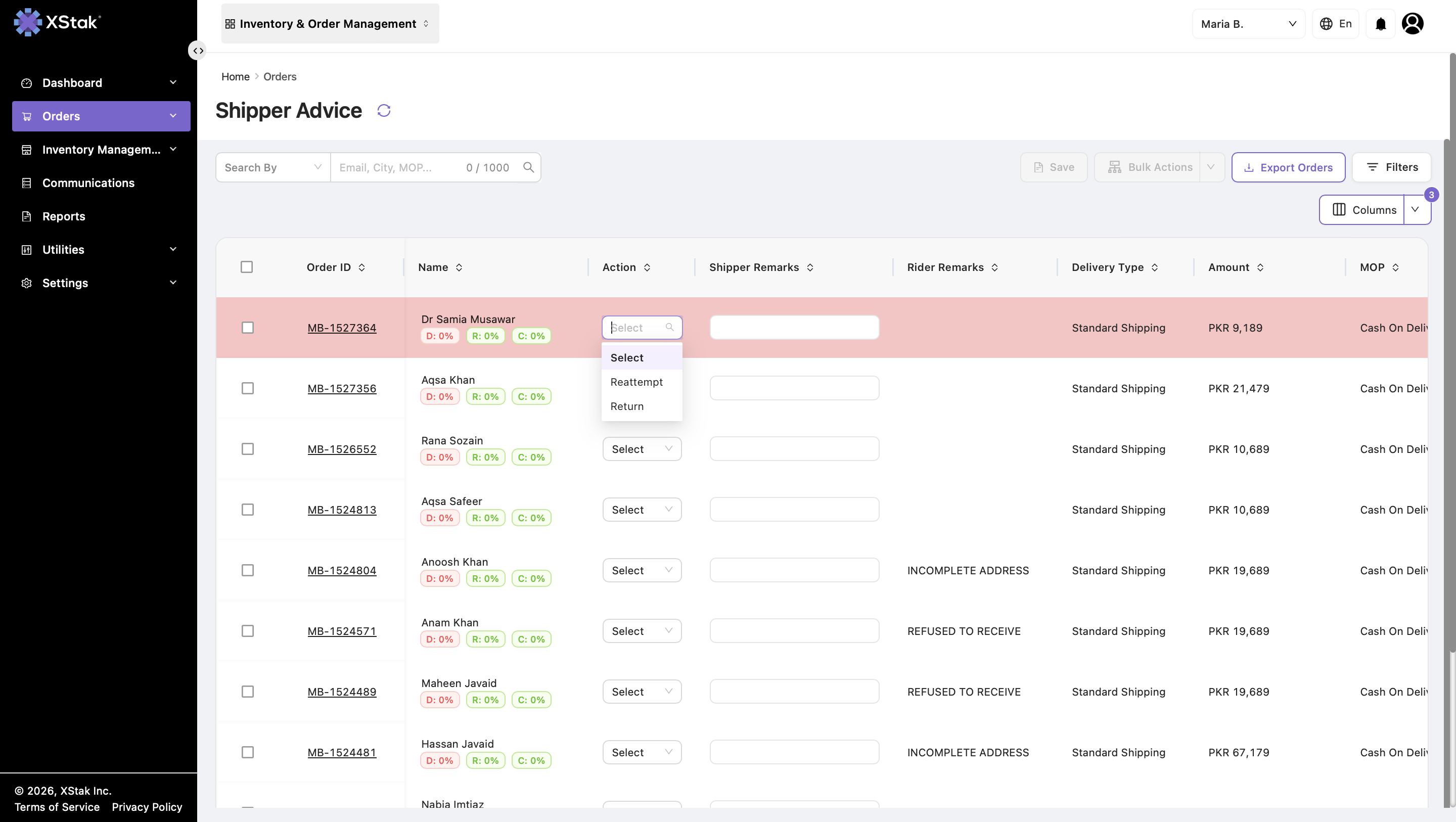
Single Order Actions
From the Action Column, users can:
-
Mark an order as Reattempt.
-
Mark an order as Return (RTO).
-
Add or update Shipper Remarks through quick edit.
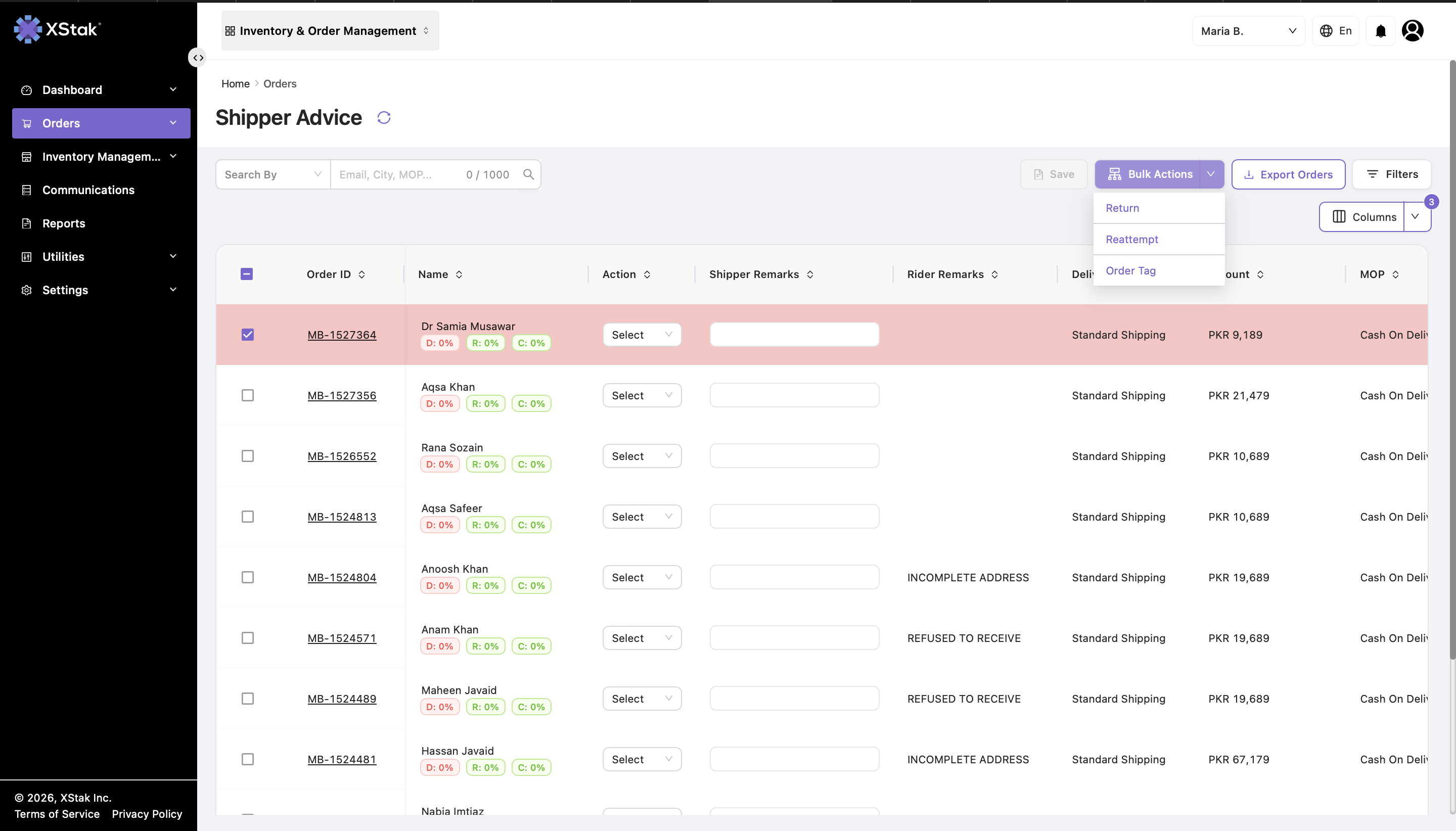
Bulk Actions
Users can select multiple orders and:
-
Mark orders as Reattempt.
-
Mark orders as Return (RTO).
-
Apply Shipper Remarks in bulk.
6. Important System Behavior
-
-
OMS shows an error for duplicate actions.
-
The system does not move the order back to Dispatched manually.
-
The order status updates automatically based on the courier response: Delivered or Returned.
-
-
Courier tracking updates can override the workflow state when a final status, such as Delivered or Returned, is received.
7. Order Movement Summary
|
Action |
Immediate Movement |
Next Stage |
Final Outcome |
|---|---|---|---|
|
Reattempt |
Courier accepts → Moves to Dispatched |
New delivery attempt |
Delivered or failed again |
|
Return (RTO) |
Courier accepts → Dispatched |
Return In-Transit |
Returned to warehouse |
7. Operational Flow
                Delivery Attempt Failed
                         ↓
                  Shipper Advice
                         ↓
        ┌────────────────┴────────────────┐
        │                                  │
   Reattempt                          Return (RTO)
        │                                  │
Courier accepts                    Courier accepts
        │                                  │
        ↓                                  ↓
   Dispatched                        Dispatched
        │                                  │
        │                                  │
        └──────────────┬──────────────────┘
                       │
           Courier Tracking Update (FINAL DECISION)
                       │
        ┌──────────────┴──────────────┐
        │                              │
     Delivered                   Return In-Transit → QC → Inventory
        │                              │
 Final Delivered                Returned Orders
9. Purpose of the Shipper Advice Module
The Shipper Advice module ensures:
-
Structured handling of failed deliveries
-
Clear visibility of rider and shipper remarks
-
Accurate decision-making (Reattempt vs Return)
-
Controlled communication with courier partners
-
Proper routing of orders into delivery or return workflows
-
Full operational accountability for failed deliveries